.png)
Waterproof Touch Screens: How IP65 Panels Protect Against Water Damage
Waterproof touch screens are now common in industrial, medical, transportation, gaming, and public terminals. However, “waterproof” is not a marketing word. Instead, it should be defined by an IP rating. Therefore, this guide explains what IP65 means, how IP65 touch screens prevent water damage, and where they are used.
IP65 = dust + water jets
Dust-tight + jet protection
Main protection method
Sealing + connectors + routing
Most common field risk
Leaky edges and cable entry
The Ingress Protection (IP) rating system defines how well an enclosure protects against dust and water. An IP code has two digits. The first digit describes protection against solid objects, while the second digit describes protection against liquids. Therefore, an IP rating helps engineers compare sealing performance across products.
What does IP65 mean?
| Digit | Meaning | What it protects against |
|---|---|---|
| 6 | Dust-tight | Prevents dust ingress that can damage electronics and seals |
| 5 | Protection against water jets | Resists water jets from any direction during rain, splashes, and washdown |
Why IP65 matters for touch screens
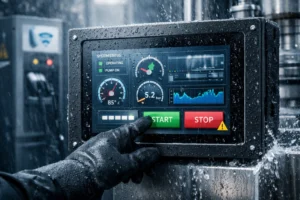
Touch screens often sit at the “front line” of a device. As a result, they face rain, splashes, cleaning chemicals, and daily washdown. IP65 helps ensure the electronics behind the glass keep working in these conditions. In addition, IP65 reduces downtime by preventing corrosion and short circuits.
Waterproof touch screens rely on both material choices and mechanical sealing. Therefore, a good design focuses on the glass, the sealing path, and all entry points such as connectors and cable exits.
Materials used
- Tempered / strengthened glass: improves scratch resistance and impact durability
- Sealing gaskets (rubber / silicone): block water at bezel and joints
- Water-repellent coatings: help droplets shed and simplify cleaning
Mechanical sealing focus
- Sealed bezel and controlled compression on the gasket
- Waterproof connectors or cable glands at entry points
- Drainage and cable routing to reduce standing water risk
In practice, a reliable IP65 design is not only about the front glass. Instead, it is about every seam, screw path, and cable opening. Therefore, the enclosure and the display module should be engineered as one system.
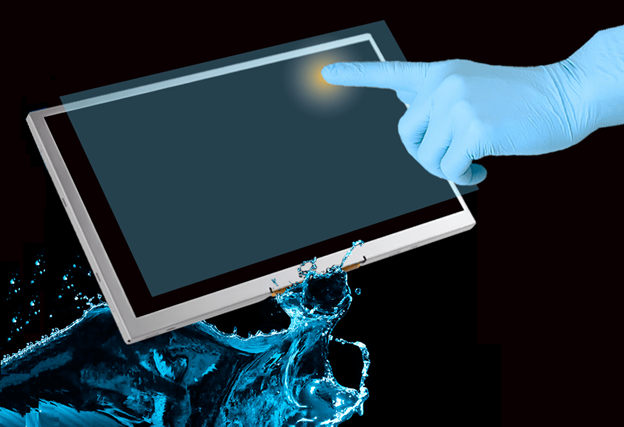
Most modern waterproof touch screens use capacitive touch technology. It detects changes in an electrical field near the sensor surface. However, water on the surface can introduce false touches if the system is not designed and tuned correctly. Therefore, good waterproof designs combine sealing with controller tuning and filtering.
Sealing keeps water out
Gaskets, bonded structures, and sealed connectors prevent water from reaching internal circuits. As a result, the system avoids short circuits and corrosion.
Controller keeps touch stable
Firmware filters and parameter tuning reduce false touches under moisture. In addition, glove and wet-touch requirements can be validated using project-specific test routines.
IP65 waterproof touch screens appear across multiple industries. They reduce failure rates where water and dust exposure are daily realities. Therefore, they are often a default requirement for field equipment and public terminals.
| Application | Why IP65 is needed | Typical exposure |
|---|---|---|
| Industrial control | Continuous dust and washdown risk | Spray, debris, oil mist |
| Medical equipment | Frequent cleaning and disinfection | Liquids, disinfectants |
| Transportation | Reliability under moisture and temperature changes | Rain, condensation |
| Outdoor kiosks / displays | Weather exposure plus public uptime requirements | Rain, humidity, wind-driven spray |
| Gaming / entertainment | Spills and rugged public environments | Spills, cleaning cycles |
| Self-service terminals | Uncontrolled environments and maintenance cycles | Rain, user spills, cleaning |
Sealed construction
A sealed bezel, controlled gasket compression, and sealed joints prevent water ingress. Therefore, internal electronics remain protected during rain and washdown.
Water-resistant touch behavior
Capacitive systems can work well in wet environments if the controller is tuned for moisture. In addition, UI button sizing and filtering can reduce accidental input.
Corrosion-resistant materials
Stainless steel or anodized aluminum resists rust and surface degradation. As a result, the enclosure maintains sealing performance over time.
Protective coatings
Hydrophobic and oleophobic coatings help water bead off the surface and simplify cleaning. Therefore, the screen stays clearer and is easier to maintain.
Where IP65 designs fail (and what to check)
| Weak point | What happens | Engineering check |
|---|---|---|
| Cable entry / connector | Water tracks into enclosure along cable | Use sealed connectors or cable glands; verify strain relief |
| Bezel corners | Gasket compression becomes uneven | Control tolerance and compression; validate corner leakage |
| Screw paths | Micro leakage through fastener points | Use sealing washers; design proper screw boss sealing |
| Maintenance cycles | Seals degrade after repeated cleaning | Choose gasket material for chemicals; define service intervals |
Ever Glory develops capacitive touch panels, touch display modules, touch monitors, and Panel PCs for industrial-grade environments. Therefore, projects that require IP65-level sealing can be matched with suitable touch stack-ups and integration approaches.
- Project guidance for sealing approach, cable routing, and enclosure interfaces
- Support for size and format selection based on environment and UI needs
- Options that align touch performance with wet and glove requirements
Waterproof touch screens with an IP65 rating provide dust-tight protection and resistance to water jets. As a result, they are widely used across industrial control, medical equipment, transportation, outdoor kiosks, gaming, and self-service terminals. However, IP65 performance depends on real sealing design, connector selection, and correct integration practices.
If you want to reduce field failures, start by defining the exposure level and washdown method. Then specify the sealing path, cable entry design, and touch performance requirements together.
FAQ
What does IP65 mean for a waterproof touch screen?
IP65 means the enclosure is dust-tight (6) and protected against water jets from any direction (5). Therefore, it is suitable for rain, splashes, and many washdown scenarios.
Can an IP65 touch screen be submerged?
IP65 is designed for water jets, not long-term immersion. If your use case includes submersion, evaluate higher liquid protection levels and a matching enclosure design.
Do capacitive touch screens work when wet?
They can, but wet conditions require proper sealing and controller tuning to reduce false touches. In addition, UI design with larger targets improves usability in rain or washdown environments.
Where do IP65 waterproof touch screens deliver the most value?
They deliver the most value where water and dust are routine: industrial control, medical cleaning environments, transportation, outdoor kiosks, and public self-service terminals.
What information should I share for a correct IP65 recommendation?
Share target IP rating, washdown method, enclosure drawings, mounting approach, cable exit direction, and touch requirements such as glove and wet touch.
Recommended next steps
High brightness plus sealing recommendations for real deployments.
Compare requirements across industries and environments.
Explore product options and integration formats.
Understand what to specify for IP, bonding, LCD, and lifetime.
Share your enclosure drawings and target IP rating, and we will recommend a waterproof touch screen stack-up.