
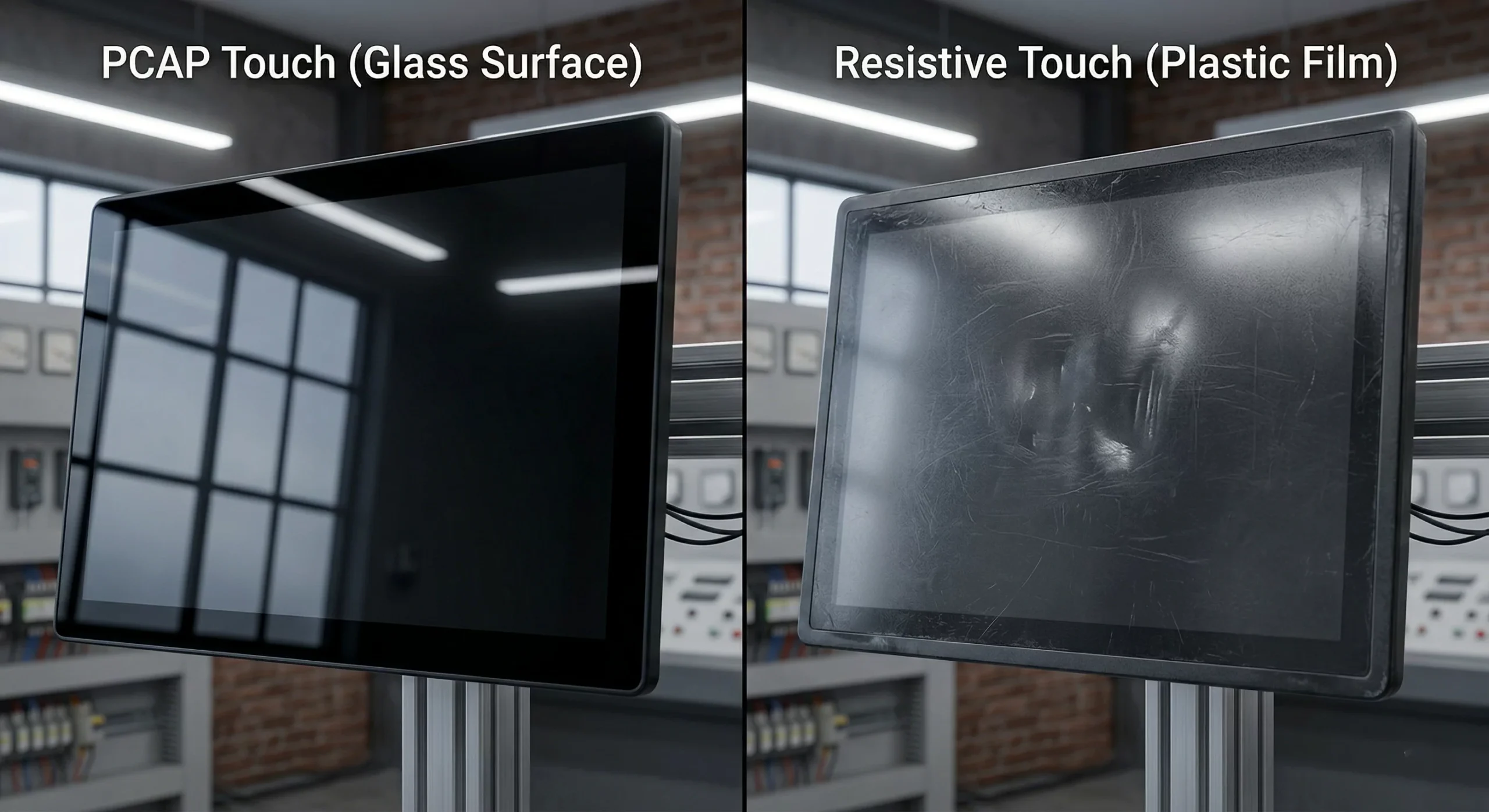
PCAP vs Resistive Touch for Industrial Touch Monitors: Which Is Better?
Touch technology matters as much as the display itself. The wrong choice can cause slow operation, visibility loss, higher maintenance, and user frustration—especially in harsh industrial environments. This guide compares PCAP and resistive touch in real engineering terms.
What Is PCAP Touch?
Projected Capacitive (PCAP) touch detects input by sensing changes in an electrostatic field through the cover glass. It is mainstream in consumer devices, but it has become the dominant choice in industrial touch monitors due to its optical clarity, flat glass surface, and multi-touch capability.
Typical strengths
- Fast, smooth touch response
- True multi-touch gestures
- High optical clarity (glass front)
- Modern, premium user experience
- Easy-to-clean flat surface
Industrial tuning options
- Glove touch
- Wet touch / water rejection
- Thicker cover glass support
- EMI/ESD stability improvements (system-level design)
- Harsh-use coatings (AG/AR/AF)
What Is Resistive Touch?
Resistive touch works through pressure. It uses two conductive layers separated by a small gap; when pressed, the layers contact and the system registers the touch point. Because it reacts to pressure (not conductivity), it can be operated with: gloves, stylus, or non-conductive tools.
Where resistive still fits
- Simple single-touch control panels
- Budget-sensitive deployments
- Hard stylus / tool-based input required
- Legacy UI without gestures
Common trade-offs
- Less optical clarity (extra layers)
- Lower perceived quality vs glass-front PCAP
- Top layer wear over time under repeated pressure
- Limited multi-touch capability (typical)
PCAP vs Resistive Touch: Key Differences
The “better” option depends on environment, UI complexity, long-term durability, and input requirements. Use the table below to make a fast decision.
| Feature | PCAP Touch | Resistive Touch |
|---|---|---|
| Touch response | Fast, smooth, gesture-friendly | Pressure-based, typically slower feel |
| Multi-touch | Yes (true multi-touch) | Usually single-touch (typical) |
| Optical clarity | Excellent (glass front, cleaner optics) | Lower (extra layers reduce brightness/contrast) |
| Front durability | Strong with glass front; premium industrial design | Top layer can wear/scratch over time |
| Glove operation | Works with industrial tuning (controller + stack) | Naturally works with gloves (pressure input) |
| Wet environments | Good with water-rejection tuning + sealing | Traditionally reliable due to pressure input |
| Stylus/tool input | Needs capacitive stylus (typical) | Works with almost any tool |
| Cost | Higher upfront, often better long-term value | Lower upfront for basic systems |
Which Is Better by Application?
Factory HMI
Most modern HMIs benefit from multi-touch, faster response, and clearer visuals.
- Recommended: PCAP
- Best with tuned controller + EMI/ESD design
Outdoor Terminals / Kiosks
Wet touch + sunlight readability depends on total stack, not touch tech alone.
- Recommended: PCAP (with tuning)
- Pair with high brightness + optical bonding
Medical Equipment
Hygiene, optical clarity, and clean glass surfaces are usually preferred.
- Recommended: PCAP
- Easy cleaning + premium UI
Basic Control Panels
- Recommended: Resistive (cost-effective)
- Best when UI is simple and single-touch is enough
Tool-Based / Stylus Input Systems
- Recommended: Resistive
- Works reliably with non-conductive tools
Decision Checklist (Engineering)
Use this checklist to align touch choice with real deployment conditions.
Choose PCAP if you need:
- Multi-touch gestures and modern UI
- High optical clarity and a premium glass front
- Better long-term perceived product value
- Easy cleaning and flat surface design
- Industrial tuning (glove/wet/water rejection) is acceptable
Choose Resistive if you need:
- Lowest upfront cost for a basic interface
- Guaranteed pressure-based glove input without tuning
- Hard stylus or tool input required
- Single-touch UI, no gesture requirements
- Legacy systems where optical clarity is secondary
FAQ
Is PCAP better than resistive touch for industrial touch monitors?
Can PCAP touch monitors work with gloves?
Is resistive touch more durable than PCAP?
Which touch technology is better for outdoor industrial applications?
Is resistive touch cheaper than PCAP?
Need help choosing the right touch stack?
Share your screen size, environment (water/dust/EMI), glove requirement, and interface (USB/I2C). Our engineers will recommend the best-fit PCAP or resistive solution and the path to production.

